CLT Logo
StressTools
CLT Suite
Analysis Engine Active

Classical Laminate Theory

Build custom composite layups and perform rigorous classical laminate theory analysis with matrices, stiffness, ε, and σ computations.

Active Laminate
0 plies0.0000" thick

Applied Loads

Force and Moment Resultants

Load Convention

Composite_Laminates.xlsm parity

Textbook CLT moment sign convention (Mx, My, Mxy). Nx, Ny, and Nxy use the same sign in both conventions; only Mx, My, and Mxy flip sign.

Coordinate System Reference
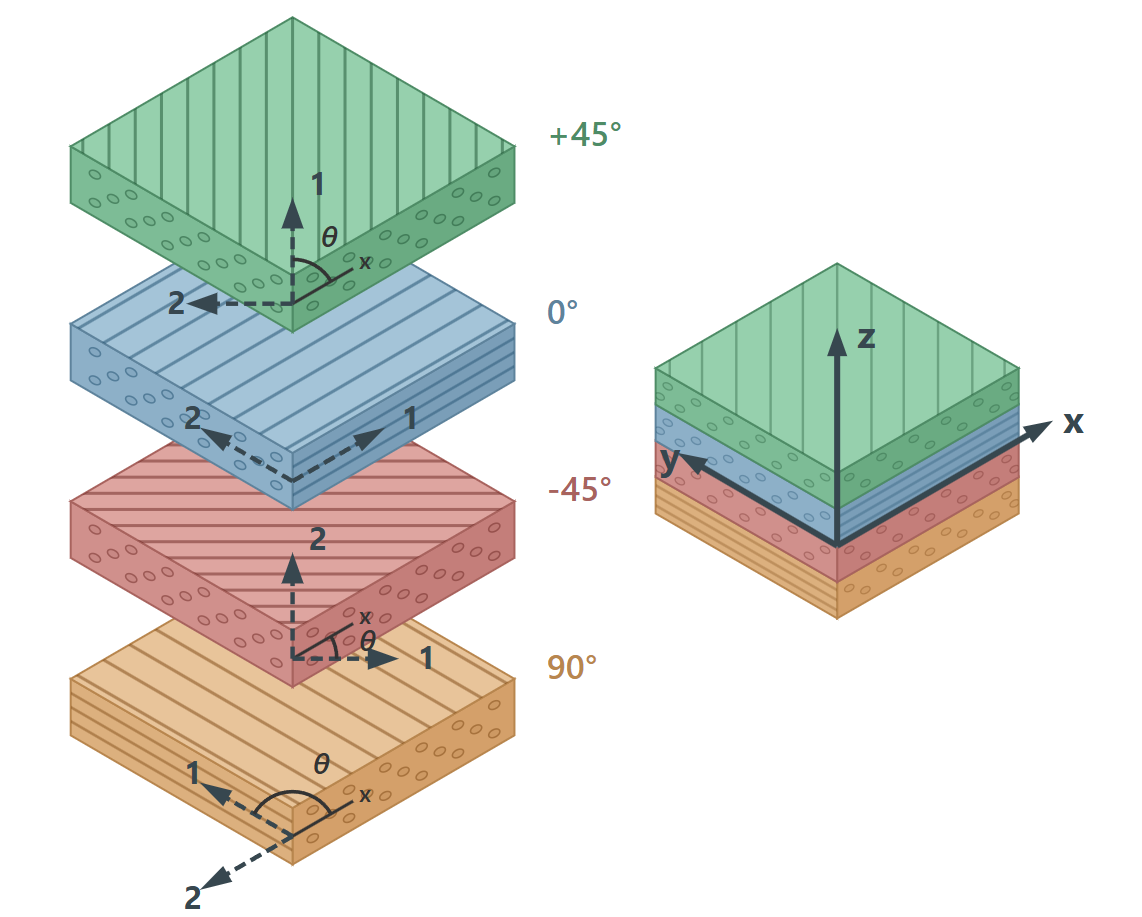
CLT coordinate system showing ply orientations (+45°, 0°, -45°, 90°) with 1-2 material axes, x-y laminate axes, and z through-thickness direction

1-2: material (ply) axes · x-y: laminate axes · z: through-thickness

Force Resultants (lb/in)

Moment Resultants (in-lb/in)

Analysis Runs Automatically

Results update in real-time. Use Workbook view or Export CSV to match Composite_Laminates.xlsm outputs.

Shared Laminate Builder

Laminate Properties

Input Allowables Format

Toggle between Strain (με) and Stress (ksi). Values in the stack and limits will convert on-the-fly.

NameET1 (Msi)EC1 (Msi)ET2 (Msi)EC2 (Msi)G12 (Msi)ν12t (in)σ₁t (ksi)σ₁c (ksi)σ₂t (ksi)σ₂c (ksi)σ₁₂s (ksi)r_c Tens (in)r_c Comp (in)K_br TensK_br Comp
Save as Custom Preset

Save the current material properties under a name so you can reuse them without re-entering values.

Quick Add Ply Angle
Bulk Add Plies
@
Ply Stack 0 plies
Use the quick-add buttons above to build your layup stack.
Total Thickness:0 in